See also:
Overview of the different parsing methods
Usually, all parsing is done using text from the received email, but sometimes you may need to parse text resulting from another actions. For example, extracting some value from an API response, get a subset of data from a database action, etc. This type of action is meant to address this problem.
The “Parse a field” action looks as follows:
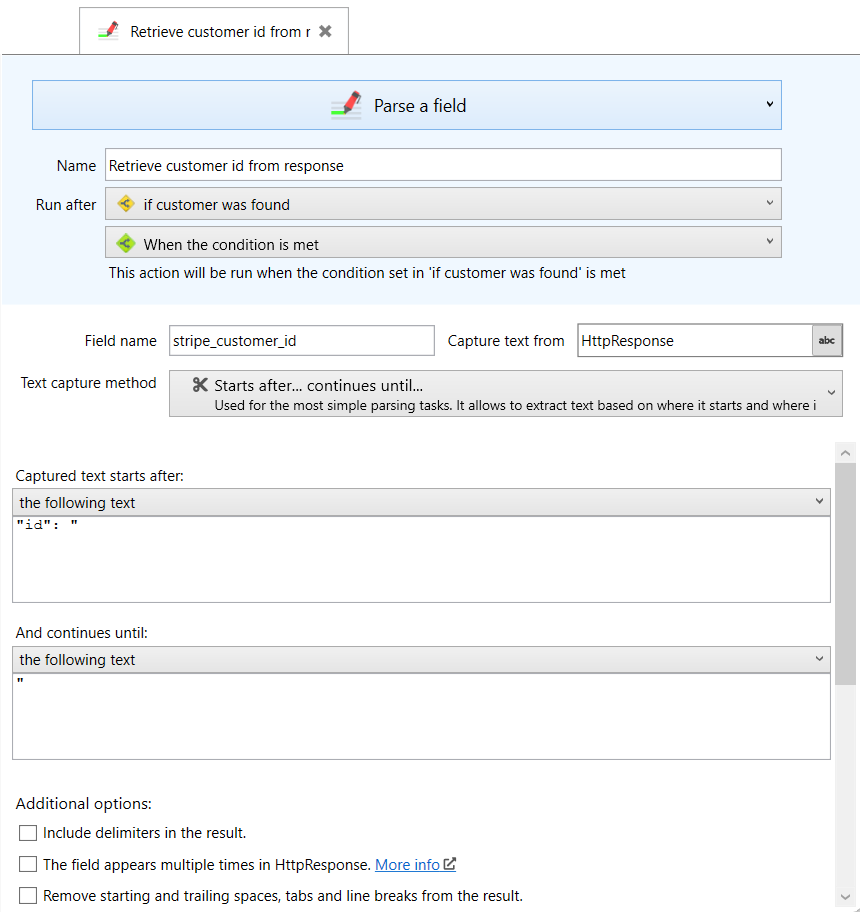
As you can see, the view is the same as if you were creating a field in the Parsers section (In the left panel, the items you can find in the middle). The only difference is that it is under the Actions.
In the example shown in the screenshot above, we needed to capture the customer id from a request we make to the Stripe api. The sequence of actions was this:
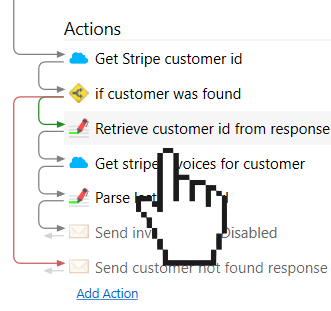
The Stripe API returns JSON responses like the following:
{
  "object": "search_result",
  "data": [
    {
      "id": "cus_123456789",
      "object": "customer",
      "address": {
        "city": "",
        "country": "",


	   ...
And we used the “Retrieve customer id from response” action to get the text that starts after the “id” and finishes with a double quote. We can use the resulting field value (customer_id) to perform the next API request.


 Go to the Web app
 Download the Windows app
